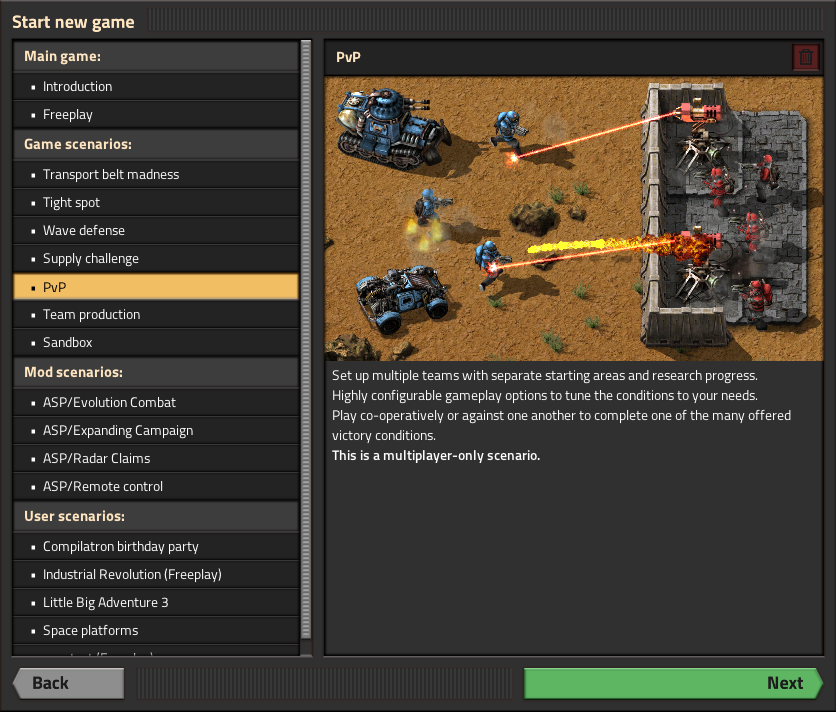
The main menu rework Twinsen Up until I looked at the source code, I was always confused about the differences between "Start campaign", "New game" and "Scenarios". New game seems like the same thing as "Scenarios"->"Freeplay", but are there any differences? We then later added a few more bonus scenarios, but they are hidden in the scenarios menu, with no explanation about what each is, what to expect or if it works in multiplayer. I believe it's very important to communicate to new players information about the game's content. It's also important to show that freeplay is the intended way to play. So all this prompted me to rework the main menu a bit. I started with the structure. The structure always seemed odd to me, compared to what I'm used to from other games. Important options like "Load game" are lost among options that are never used (like "Replay game"). So I came up with a new structure. It looks like this: Continue Single player New game Load game Multiplayer Host new game Host saved game Browse public games Browse LAN games Connect to address Map Editor New scenario Convert save Settings ... Mods About The first new thing to notice is the "Continue" button. Since "start the game and continue my last save" is probably the most common thing players will do, it makes sense that there is an option for this right at the top of the main menu. The button will contain the name of your latest save. Pressing it will immediately load the game and get you in game. Due to implementation complications, for now it only handles save games and it will NOT connect you to the last server you played on if your last play session was multiplayer, but I might implement that if it's highly requested. Next, everything was grouped into either Single player or Multiplayer. There are much fewer options, since "Replay game" was moved as a small button in "Load Game", and every way to start playing the game was moved to the new "New Game" GUI. The "New game" GUI shows all the ways to play the game. It also groups them nicely, places freeplay on top, shows a description and even a nice image. This GUI is used for new game, multiplayer hosting and map editor, thus simplifying the menu quite a bit. For modders, scenarios can now contain a description.json file. In the file "order" determines the sorting in the New Game GUI; "multiplayer-compatible" determines whether the scenario is shown when trying to host multiplayer games. "multiplayer-compatible" was added to description.json file of campaigns also.

Hello, long time no talk, we've got some catching up to do... Almost 1 year ago (FFF-365) we said "we don't think that [the expansion] will take less than a year to develop". Well it has been less than a year and it is not finished, so we kept our word on that :). But while it might not be finished, there is a still a lot we have done so far.
Hello everybody, the work on the 0.13 is slowly getting to the final phase and hence it feels like a good time to give an overview of actual multiplayer changes that have been implemented over past couple of weeks. This is a recap and extension of a FFF post that mentioned the Multiplayer improvements while there were in progress.

Warning this Friday facts is about the Introduction scenario, not about anything that will be in Freeplay Factorio. You may want to read previous FFFs (FFF-257, FFF-284) about the Introduction. TLDR: the Stable candidate of the Introduction scenario is now in Experimental please play it and send me your screenshots. Feedback especially on the “freeform endgame” would be greatly appreciated. We have also released a Experimental version of the Demo, be sure to send this link to your friends ASAP. SPOILER WARNING: If you have not yet played the Introduction Scenario, go play it before you read this.
New sound design Val: Do you remember the smell of the fresh air near the seashore? Can you describe, a forest that rumbles its trees after a summer rain? All that you hear and see goes right into your mind. All of our senses are connected with each other in our memories. When we feel at least one of them, our imagination brings the others. Sometimes, and even often, we can't see the object, but we can hear it! You can't see the wind, but you feel it and hear it! The bird is singing. You can't see it hiding in a bush, but you hear a beautiful song and can define the direction it comes from. The forest, the sea, the desert... Night and day. Clanking of a loading cannon and snoring of unseen monsters. That is what we are planning to do. To put the unseen colors of sound and add some feeling of life to the planet of Factorio. Even the emptiness has it's own voice... Albert: As you probably know, we are in a stage of polishing all the possible aspects of the game. Last week we were cooperating with Val, our new sound designer, and we spent the entire week defining new concepts for environmental sounds and sound effects. Also we were working on the sound of the biter nests and the artillery cannon. This is definitely a huge subject full of details that can really improve the play experience of Factorio. Here I can show you a work in progress of the artillery cannon: We have to tweak some behaviour of the entity in order to make it act more mechanical, but overall, the possibilities that sound design can bring to the game are really interesting. Compare the simple shooting of the cannon in the actual version with this proof of concept with all those details in rotation and loading. Of course this level of detail complicates the work a little bit, but I'm convinced it's worth it.
As you are probably already aware, some of our team members are going to attend PAX East in Boston next week. We figured we need some representative prints for our booth, but what to put there? We could have just made a big mega high resolution render of the player character or some other entity, but that would not tell the viewer much about what the game is about. So we thought it would be much better to "just" take a giant screenshot of a working factory, print it, and done! Now of course it’s much more complicated than that… The first obvious hurdle is that you need a savegame to take this screenshot of. So you go and try to take a bunch of random saves on your disk, you open them and find that it’s not so easy to just find a factory which would look nice. Such a factory needs to show enough of the various things to represent the game, can fit the logo somewhere, and must be large enough to fill about 275x185 tiles (3x2 meters at 150dpi taken at game zoom 2)... one square in the following picture is a chunk (32x32 tiles) Luckily I just had a savegame which was easy to adapt to those requirements, but I would like to ask the question, how does one build such a factory in general? That’s what I have been trying to figure out for a long time now. As some of you may have already noticed, I enjoy constructing very organic factories, a part of which eventually turns into a crazy mess. A mess as crazy as Factorio itself, representing what your will brain look like after playing Factorio. I find this to be a good opportunity to be a bit more specific and see a few examples to put it into more context...

Water animation - Concept Albert Since the very beginning of the project, we have focused a lot in the side of the factory, providing better designs for the machines, and expressive animations that give a sense of life and credibility in this area. We put a lot of effort also in the environmental side, adding different tile sizes, improving textures, adding doodads, cliffs, trees, decals, and constantly improving the map generation for a better feeling. But apart from biters and the factory, nothing else moves in this Factorio planet. So the environment is nice looking but it feels somehow unreal due this lack of motion. Today we proudly present the first experiment in this area: Animated water. This animation doesn't try to grab your attention, it's just there. Slowly moving. I personally bet that this animation, with the proper sound design, will provide the natural feeling that the planet needs.

He who does nothing, breaks nothing posila In the recent patch notes, there was a line "Fixed landfill spawning under player when building landfill elsewhere. More" and some people on Reddit were wondering how did this bug happen in the first place, and asked for the long version and even suggested we could even use it for Friday Facts, and I thought: "Yeah, if I am going to spend time writing this, we should consider using it in FFF so someone else doesn't have to spend time writing something else." ... but I am going to stretch it out. The landfill bug reported after the release of 0.18.21. Disclaimer: I have not been around during the ancient parts of this story (speaking of which, it's my 5 year anniversary at Wube, yay!), and changes I have been around for, or even done myself, I might not remember correctly. So this might not be accurate. In fact, let's say the story is purely fictional and any resemblance to real world events and people is just a coincidence.
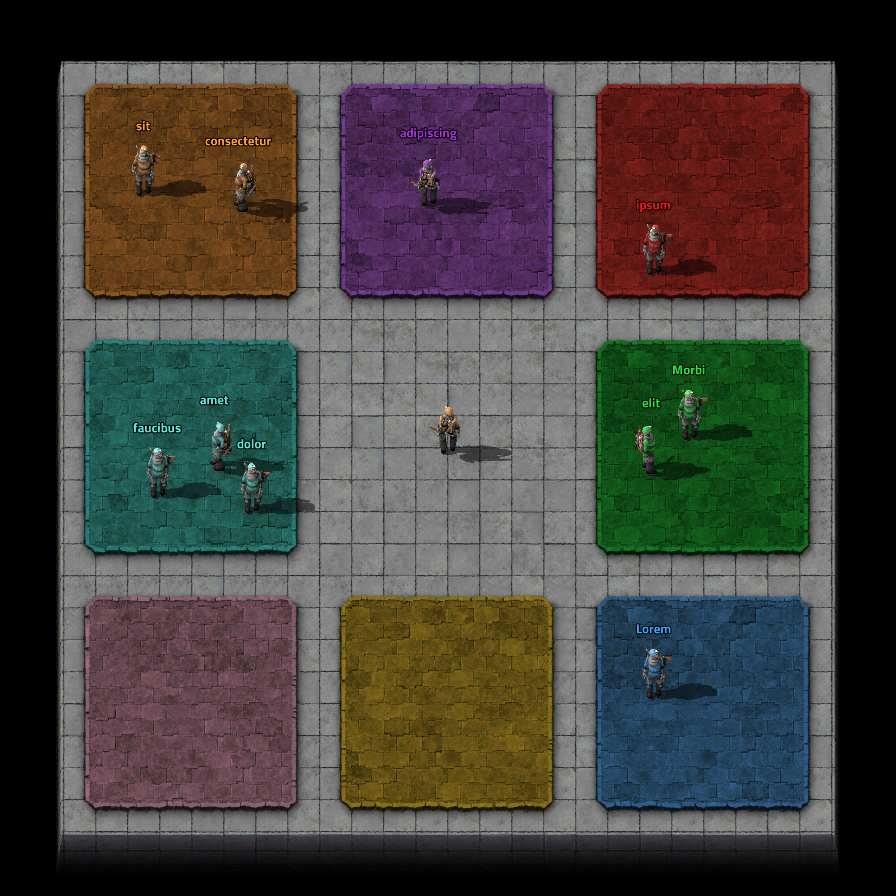
Team production changes Improving the Team production challenge was prompted by this Reddit post. Team production was made back in 2016 to test the multiplayer networking of the 0.14 update with a larger number of players without the overhead of having a large factory. Since then it has not really had much love. So after 4 years of accruing wisdom, I started making some general improvements.

Hello there, I know a lot of you have been eagerly awaiting some solid information on the new planets, if so this blog is for you. Get comfy because it's a long one. As you already know, there are 4 new planets in the expansion. We will take an in-depth look at each planet's terrain, challenges, processes, technologies, and new gear, but not all at once. In some cases the planet content will be split into multiple parts. To kick things off I'll cover the terrain and natural aspects of the planet that is closest to being finished. I'll need to be in games master mode for this:
